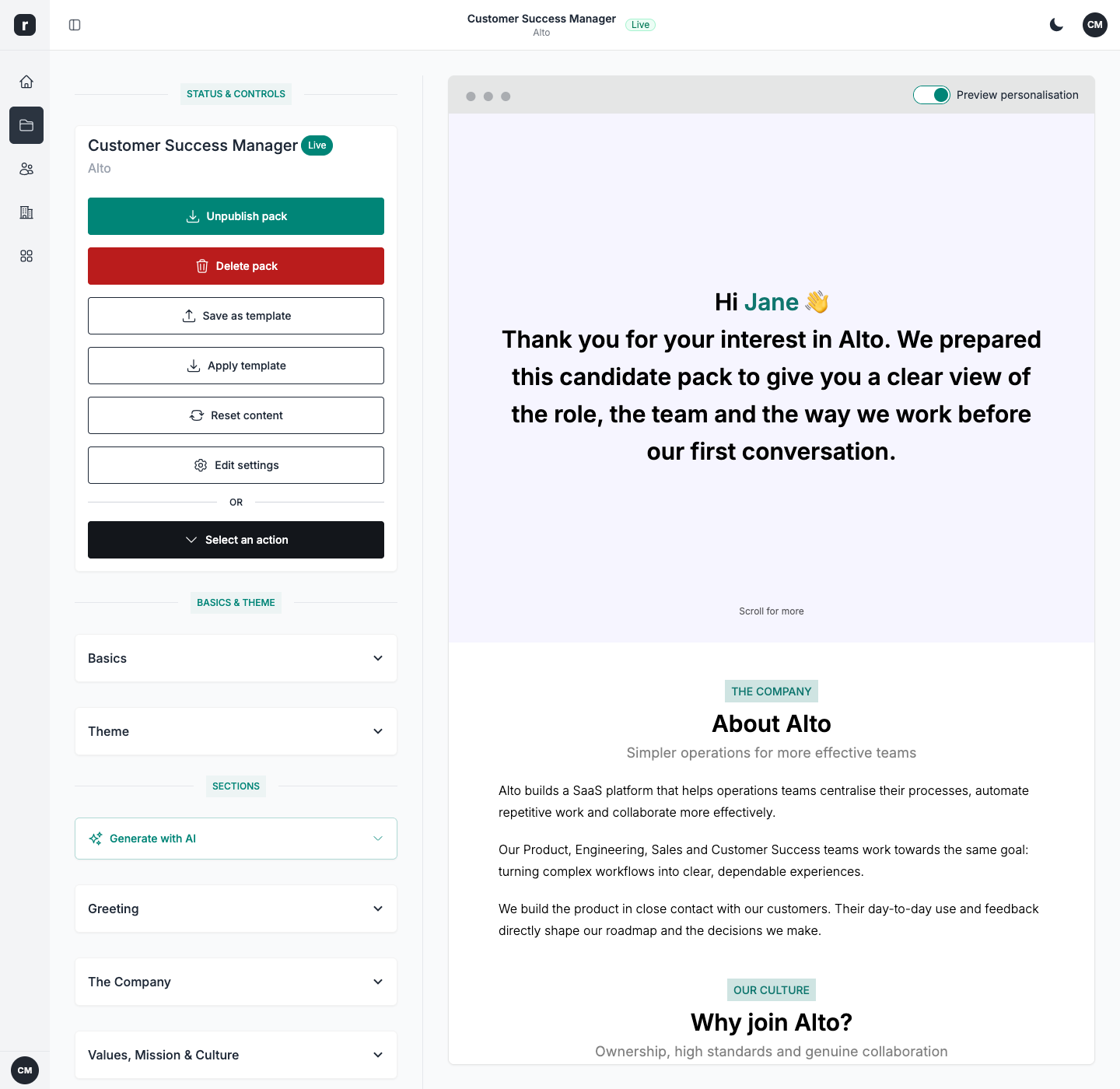



Landing Page Builder

Create personalised candidate pages with AI

Start with a role brief. Role.so drafts eight structured sections that you can edit, personalise, and publish without code or design support.

Join talent teams already creating better candidate experiences with Role.so.
Start in minutesFull access during your trialCancel anytime

Trusted by recruiters at

Talent Match Makers logo
Snipebridge logo
Prime Workforce logo
Octohire logo
Jiro Jobs logo
Capabilities

Build a page candidates want to read

AI-generated starting point

Generate a structured eight-section first draft, then customise the role, company, benefits, and hiring process content.

Personalisation

Add the name token once and greet every candidate personally.

Reuse a proven setup

Start from your workspace's saved setup or duplicate a successful pack, then tailor it to the next role.

Redirect links

Send 'I'm interested' clicks to Calendly, an ATS apply link, or any URL.

PDF export

Export any pack to PDF for offline sharing and archives.

AI-assisted creation

Give AI the brief, then make the page yours

Enter the role, company, and an optional job description. Role.so drafts eight key sections for you to review, personalise, and publish.

Nothing goes live until you have reviewed and edited the draft.

Draft all eight sections at once

Create the greeting, company, role, benefits, interview, FAQ, and the remaining core sections in one flow.

Set the tone and level of detail

Choose a professional, casual, or friendly tone, then decide how much detail you want.

Refine any section with feedback

Ask for a shorter, clearer, or more specific version without rewriting the whole page.

How it works

See the builder in action

Make every candidate feel personally addressed

Every candidate lands on a page that feels written for them. Add the name token once and Role.so replaces it with the visitor's first name. Role and company tokens keep the page tied to the position you are hiring for.

  • Candidate name token, resolved per visitor
  • Role and company tokens for hiring context
  • Works throughout the rich content of your sections
The first landing page I created gained brilliant traction.

James

Talent Lead

Make every candidate feel personally addressed

A live editor, not a fixed document

Edit each section inline and see the changes straight away. The same preview shows how the page will look to candidates on desktop and mobile.

  • Inline visual editing with live preview
  • 11 ready-to-use sections for the role, company, perks, interview, FAQ, and more
  • Responsive: looks right on every screen
The candidates love the holistic overview and the personalised touch.

Hannah

Talent Partner

Built in

A strong first draft that is still yours

8
key sections generated by AI
3
tones for your first draft
11
ready-to-use page sections
Testimonials

What recruiters say about Role.so

Role.so is awesome! The first landing page I created gained brilliant traction, and with the help of the feedback and metrics, I was able to optimise my strategy even further. What's not to love?
JamesJames, Talent Lead
Clean interface and meaningful metrics. The candidates love the holistic overview and the personalised touch. And the best part: candidates are self-filtering themselves. Can't imagine going back to how things were before.
HannahHannah, Talent Partner
It has always been more challenging to garner the attention of passive candidates. With Role.so it's extremely easy, it saves me so much time, and everything is streamlined.
AmmyAmmy, Talent Acquisition Specialist
FAQ

Frequently asked questions

Can I edit AI-generated content before publishing?

Yes. Every generated section remains editable, so you can review the draft, refine it with your own instructions, and approve the final content before publishing.

Is there starter content available?

Yes. Role.so provides sample content that you can tailor, or you can begin with a blank page.

Can I personalise each page per candidate?

Yes. Add a name token and each candidate sees their own first name when they visit. Role and company fields reflect the position you are hiring for.

Can I duplicate a page for another candidate?

Yes, any page can be duplicated in one click and tweaked independently.

What can Role.so's AI generate for a candidate landing page?

Role.so can generate starter content for eight key sections from a role title, company, and optional job description. You can choose the tone and length, refine individual sections with feedback, and review or edit everything before publishing.

Build a candidate experience worth replying to

Create, publish and improve personalised hiring experiences from one connected platform.

Start your free trial